
Registration
Our dashboard supports different registration methods:
- New customer? Use open registration or Google or GitHub
- Existing customer testing the beta? Use the WHMCS integration
Open registration
Section titled “Open registration”- Head over to https://dash.galaxygate.net/-/register
- Fill in your account details and any coupon code you received
- Hit “Register”
- Click the confirmation link in the email we send you
Google or GitHub
Section titled “Google or GitHub”- Head over to https://dash.galaxygate.net/-/register
- Hit “Google” or “GitHub”
- Approve the login request
If the provider’s email matches an existing account, we link the provider to that account instead of creating a new one. The provider account must have a verified email address.
Accounts created this way have no password. To add one, follow Reset Password.
WHMCS integration
Section titled “WHMCS integration”If you are an existing customer, WHMCS registers you on your first purchase. To log in to our dashboard:
- Head over to the service’s information page in WHMCS
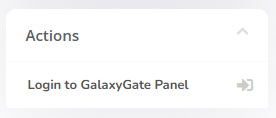
- Click “Login to GalaxyGate Panel” in the actions sidebar
Accounts created from WHMCS have no password. To add one, follow Reset Password.